Read Your First Report
What every number on the one-page sheet means, and who to send it to.
On this page
Your dashboard is for you, and it moves every day. The report is a single printable page you can hand to someone who does not have a login and does not want one: a business partner, your accountant, a franchise office, a lender asking what your marketing actually returns.
This guide walks through it section by section, so that when someone asks you what a number means, you have the answer.
Before you start
- Your CaughtLeads login.
- At least one held appointment, otherwise the sheet is mostly empty and there is not much to read.
- About five minutes.
Step 1: Open and download it
Open Attribution in the sidebar, then follow the link to the report. The controls sit above the sheet and do not appear in the saved file.


- 1
Press Download PDF
Your browser’s print window opens. Choose Save as PDF as the destination rather than a printer.
- 2
Leave the margins and scale alone
The sheet is already laid out for a page. Changing the scale is the usual reason a report comes out split awkwardly across two.
- 3
Save it somewhere you will find it again
Name it with the month. The sheet is a snapshot of the day you made it, so next month’s will be different.
Nothing is sent anywhere
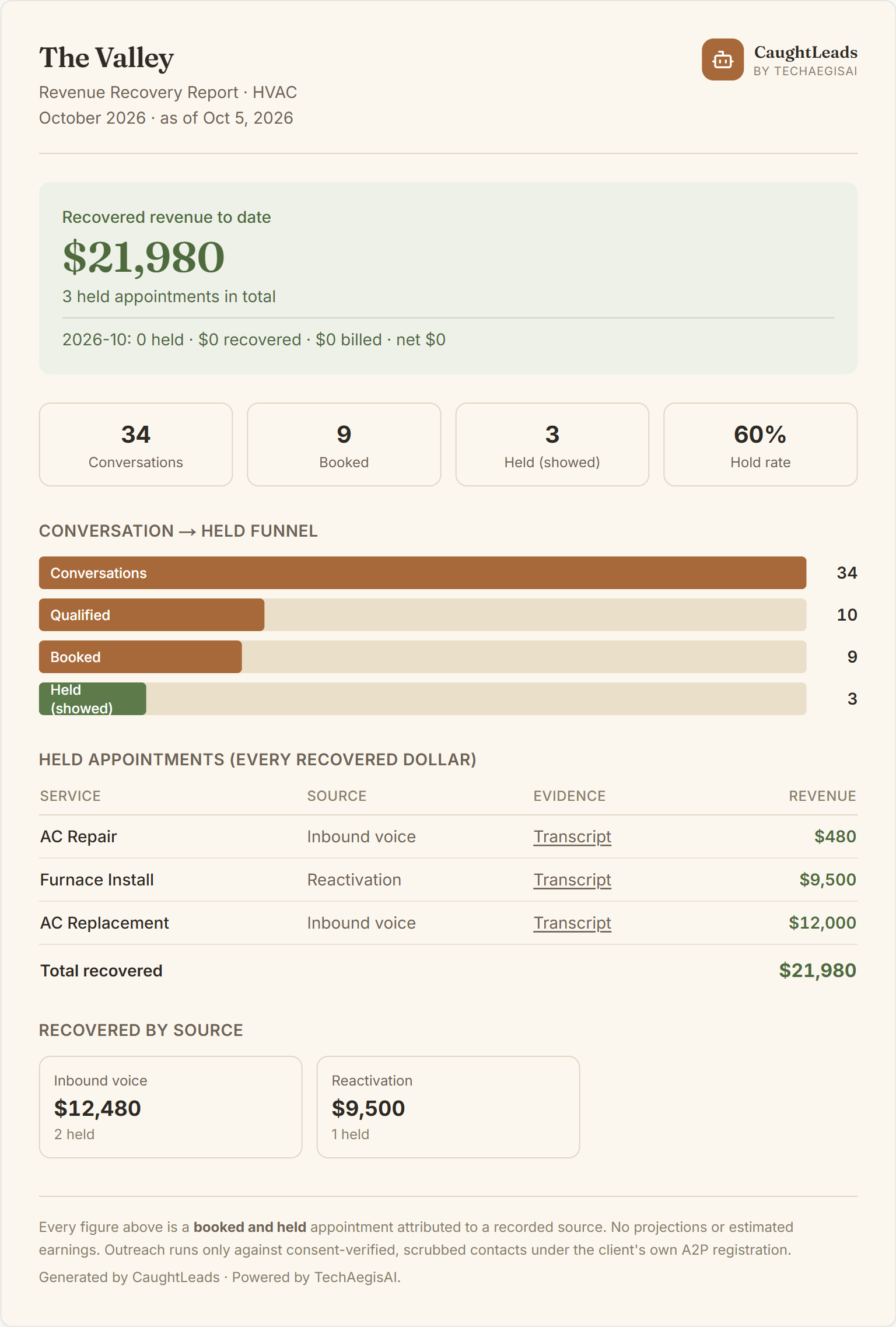
Here is a whole sheet, so you can see how the sections sit together. The rest of this guide walks down it in order.
The headline, and the line under it
The big green number is recovered revenue to date. It is everything your receptionist has ever booked that the customer then actually showed up for, added together, all the way back to the day you started. It is not this month.
The smaller line underneath it is this month, and it is the one to look at if you want to know whether the service paid for itself recently. It reads like this:
- held
- How many appointments were kept in this period.
- recovered
- The final invoice totals of those appointments: what you entered, or what your software sent back.
- billed
- What we charged you over the same period.
- return on billed
- The second divided by the third. A 5x means five dollars of kept work for every dollar you paid us. Shown only when we billed you something in the period.
- net
- Recovered minus billed. The plain difference, in dollars.
Do not divide the big number by one month's bill
The four numbers across the top
- Conversations
- Every call your receptionist handled. Not every one of them was a job, and that is expected.
- Booked
- Callers who agreed to an appointment on the call.
- Held (showed)
- Of those, the ones who actually went ahead. This is the only number we count as money.
- Hold rate
- Held divided by held plus no-shows, as a percentage. Of the appointments that have happened, how many turned into real work.
If your hold rate is low, the problem is usually not the receptionist: the appointment was made and then something happened afterwards. Reminders, confirmation calls and shorter lead times are the levers that move it.
The funnel: where callers stop
Four bars, each narrower than the one above it: conversations, qualified, booked, held. The useful information is not any single bar. It is the biggest drop between two of them.
- A big drop from conversations to qualified
- Most of your callers are not work. Wrong numbers, sales calls, existing customers chasing something. Normal, and worth knowing before you spend more on ads.
- A big drop from qualified to booked
- Real callers with real jobs are not committing. Price, availability or how the receptionist answers a particular question. This one is fixable and worth looking into.
- A big drop from booked to held
- They said yes and did not go ahead. That is a follow-up problem, not a phone problem.
Held appointments, line by line
Every dollar in the headline is itemised in this table. Nothing is bundled or summarised away. Four columns:
- Service
- What the job was.
- Source
- Where the caller came from. Inbound voice is someone who rang you. Reactivation is a past customer we texted. Speed-to-lead is a web enquiry we called back fast.
- Evidence
- A link to the actual call. This is the important one.
- Revenue
- The final invoice total for that job.
The Evidence column is the whole point
A row showing a dash instead of a link was not booked by us on a call. It still counts, and it says so plainly rather than linking you nowhere.
Where the money came from
Small boxes splitting the total by source, with the dollars and the number of held appointments in each. This is the section that tells you which channel is actually earning, as opposed to which one is busiest.
A source with few appointments and a large total is the one to pay attention to. Fewer, better jobs beat a high call count every time.
The small print at the bottom
The footer says every figure above is a booked and held appointment attributed to a recorded source, with no projections or estimated earnings. That sentence is there deliberately, and it is the reason the report can be handed to an accountant.
We never put a number on this page for work that might happen, could have happened, or was quoted and not done. If an appointment is on here, somebody turned up.
Who to send it to
- A business partner who wants to know what the phone is doing without logging in.
- Your accountant or bookkeeper, at the end of a period.
- A franchise or regional office that asks for monthly numbers.
- A lender or an investor asking what your marketing returns. Each figure links to the call behind it (opening a link needs a CaughtLeads login).
- Yourself, once a month, saved with the date. Twelve of these in a folder is a year of history nobody has to reconstruct later.
If something looks wrong
The revenue looks too low
Usually only some of your finished jobs are being reported back. A booking sits at booked, and worth nothing, until something tells us the job was done and what it came to. If your field-service software is connected, check that half of the setup. If it is not, you can mark an appointment held by hand and the amount counts the same.
An appointment is held but the amount is wrong
Whatever total your software sent is what we counted, so the usual cause is that an estimate was sent instead of the final invoice. Send a correction and the amount updates while keeping the date it was first held. A total you entered by hand always wins over anything your software sends later.
The PDF is split across two pages
The scale was changed in the print window. Set it back to the default and the sheet fits.