Forward Your Business Line
The step that takes you live, in one code from your own phone.
On this page
This is the step that takes you live. Until your business line forwards to your AI receptionist, the AI has nothing to answer. It takes about two minutes and one short code dialled from your own phone.
Before you start
- Your CaughtLeads account, with a phone line already provisioned.
- The business phone itself, in your hand. Most carriers only accept the code from the phone whose calls are being forwarded.
- A second phone to test with, so you can call your business number and hear what a customer hears.
- Who your carrier is. Verizon, AT&T, T-Mobile, Comcast, Spectrum, or a business phone system such as RingCentral.
You keep your own number
This is the part people expect to be harder than it is. You do not change the number on your van, your website or your business cards, and you do not tell a single customer anything.
Your business gets a second, dedicated number from us, which your customers never see. You forward calls from the number you already advertise to that one. Your AI answers them, and everything else about your phone stays as it was.
Your line is yours alone
Step 1: Find your AI receptionist number
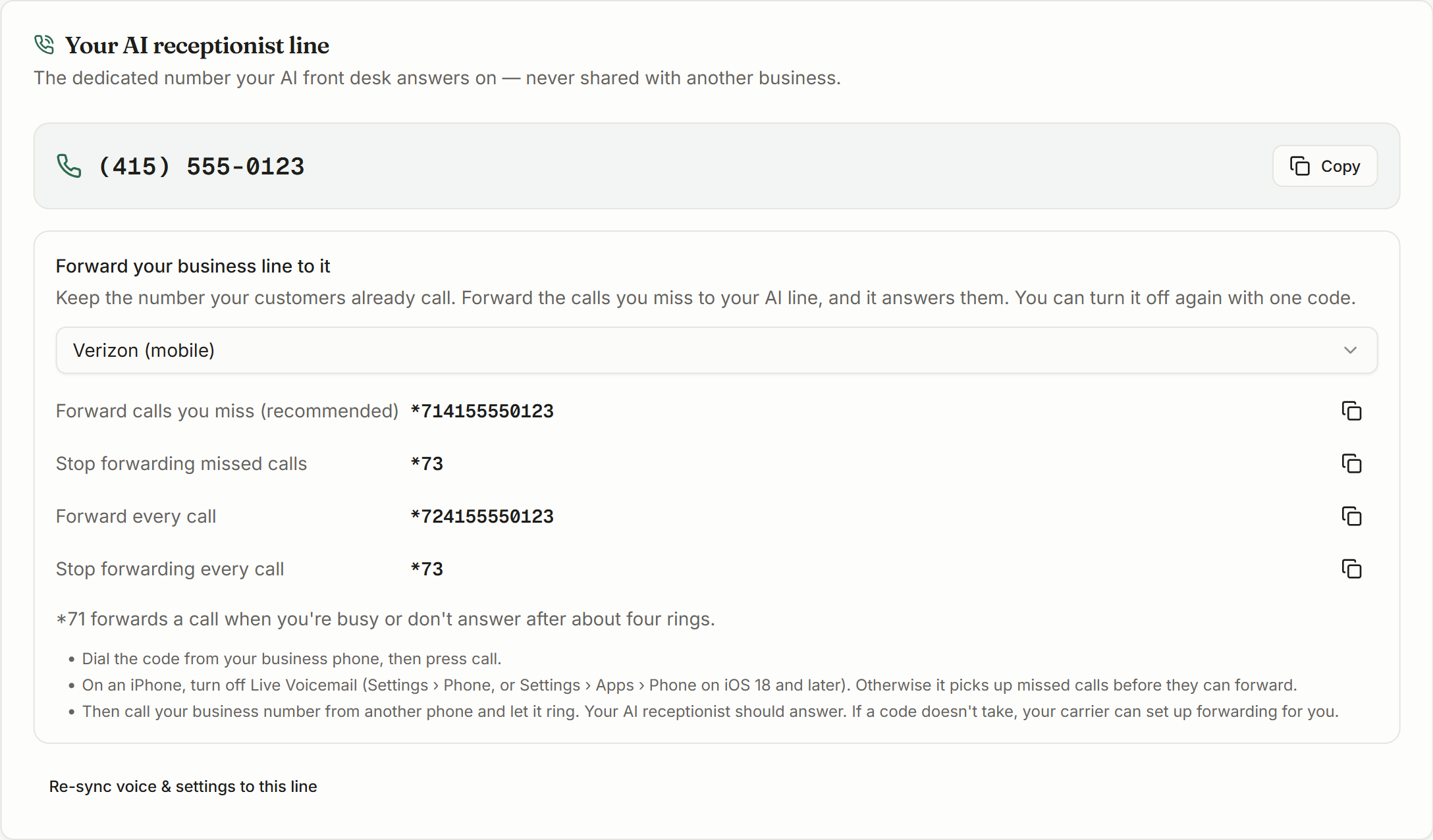
Open Business Config in the sidebar. The card at the top, Your AI receptionist line, shows your number with a Copy button beside it.
Underneath it is the forwarding panel. Everything you need for the next two steps is in that one box, already filled in with your own number.
If the card asks you to get a number
Step 2: Choose what you want forwarded
There are two ways to do this, and the first one is what we recommend.
- Forward the calls you miss (recommended)
- Your phone rings as it always has. If nobody picks up after about four rings, or the line is busy, the call goes to your AI instead of voicemail. You keep answering the calls you want to answer.
- Forward every call
- Your phone does not ring at all. Every caller reaches the AI first. Useful out of hours, on a job site, or during a week when nobody is in the office.
Most owners start with the first and never change it. It is the lower-risk option: if the forwarding ever misbehaves, you still have your own phone ringing in front of it.
You can switch between them whenever you like
Step 3: Dial the code from your business phone
In the forwarding panel, choose your carrier from the dropdown. The codes update with your own number already built into them, and each has a copy button.
- 1
Pick your carrier from the dropdown
If yours is not listed, choose Another landline or carrier. Most US landlines use the same two codes.
- 2
Copy the code on the row you want
Forward calls you miss (recommended) is the first row. The code already contains your AI number, so there is nothing to type in yourself.
- 3
Dial it from the business phone and press call
Dial the whole thing exactly as shown, including the star and any hash. You will usually hear a short confirmation tone or a recorded message, then the call ends by itself. That is normal.
iPhone owners, do this first
Some systems have no code at all
Google Voice needs us
Step 4: Test it with a real call
Do not skip this. A code that silently did not take looks exactly like a code that worked, right up until a customer calls on a Saturday.
- 1
Call your business number from a different phone
Use a mobile that is not the business line. Calling yourself from the same phone does not test anything.
- 2
Let it ring out
If you forwarded only missed calls, you have to actually not answer. Let it ring about four times and wait.
- 3
Listen for your receptionist
It should answer with your business name, say that it is an AI assistant and that the call may be recorded, say how to opt out, and then ask how it can help. It says all of that at the start of every call.
- 4
Have a short conversation and then check the dashboard
Ask for something a real customer would ask for. Then open Conversations and confirm the call is there with its transcript and summary. That proves the whole path end to end, not just the ringing.
Turning it off again
Forwarding is reversible with one code, and the off codes sit in the same panel as the on codes. Nothing is locked in, and you do not need to contact us.
- On Verizon and most landlines, *73 turns forwarding off.
- On AT&T, ##61# stops missed-call forwarding and #21# stops forwarding everything.
- On T-Mobile, ##61# and ##21# do the same, and ##004# turns off every kind of forwarding at once.
- On a business phone system, remove the call-handling rule you added.
Use the panel rather than this list
If something does not work
The code was rejected, or nothing happened
Check you dialled it from the business phone itself rather than another handset, and that you included the star and any hash exactly as shown. If it still will not take, call your carrier and ask them to set up forwarding to your AI number for you. They can do it from their end in a couple of minutes, and that always works.
My phone still goes to voicemail instead of the AI
Your voicemail is picking up before the forward does. On an iPhone this is almost always Live Voicemail, covered above. Otherwise ask your carrier to lengthen the ring time before voicemail answers, or forward every call instead of only the missed ones.
The AI answers but the caller hears nothing
This is a different problem from forwarding, and forwarding is working if the AI picked up. See Customer Could Not Hear the AI.
Calls forward, but nothing shows in Conversations
Check the number you forwarded to is the one on your Business Config card and not a digit out. A call forwarded to the wrong number will still connect somewhere, which is why this one is easy to miss.
I want to forward only after hours
Star codes cannot do this on their own: they are either on or off. If you are on a business phone system, a time-based rule in the admin portal will do it. Otherwise set your business hours in CaughtLeads and leave missed-call forwarding on all the time: you answer when you can, and we take whatever you miss, day or night.